
SSH- Enabled shared hosting wordpress sites. When launching a new WordPress website, shared hosting is often the preferred choice because it offers an affordable and beginner-friendly way to get online. However, as your website grows, you may find yourself needing more control over your hosting environment. Tasks such as managing files through the command line, running advanced scripts, or handling large database exports can become difficult without additional server access.
Many website owners face a common challenge: they need greater flexibility but aren’t ready to invest in a VPS or dedicated server. This is where SSH (Secure Shell) access becomes extremely valuable. SSH allows you to securely connect to your hosting account and perform advanced administrative tasks without the higher costs associated with premium hosting solutions.
While some shared hosting providers restrict SSH access due to security concerns, several reputable hosts still offer it as part of their plans. These providers give developers, bloggers, and business owners the ability to manage their WordPress sites more efficiently while keeping hosting costs under control.
In this guide, we’ll compare the top SSH-enabled shared hosting providers for WordPress websites. First, we’ll provide a quick comparison table to help you evaluate your options at a glance. Then, we’ll explain how SSH access works in shared hosting environments and explore the features, performance, pricing, and benefits of each hosting provider in detail.
Best SSH-Enabled Shared Hosting Providers for WordPress: Quick Comparison
Choosing the right SSH-Enabled Shared Hosting provider can make a significant difference in how efficiently you manage your WordPress website. SSH access gives developers and advanced users greater control over server management, file transfers, database operations, and command-line tools without upgrading to expensive VPS hosting.
To help you find the best option, we’ve compared some of the leading SSH-enabled shared hosting companies based on pricing, control panel availability, WordPress development tools, and advanced features.
| Hosting Provider | Starting Price (Renewal) | cPanel | WP-CLI | Composer | Node.js |
|---|---|---|---|---|---|
| Bluehost | $1.99/mo ($4.07/mo) | Yes | No | Yes | Yes |
| Network Solution | $2.69/mo ($7.99/mo) | Custom Panel | Yes | Yes | No |
| InMotion Hosting | $4.59/mo ($10.99/mo) | Yes | Yes | Yes | Yes |
| Hosting.com | $2.99/mo ($12.99/mo) | Yes | Yes | Yes | Limited Support |
| GreenGeeks | $2.95/mo ($12.95/mo) | Yes | Yes | No | Limited Support |
What to Look for in SSH-Enabled Shared Hosting
When comparing hosting providers, don’t focus solely on price. The best SSH-Enabled Shared Hosting plans should also include:
- Secure SSH access for advanced server management
- WP-CLI support for easier WordPress administration
- Composer compatibility for PHP dependency management
- Node.js support for modern web applications
- Reliable uptime and fast server performance
- Beginner-friendly control panels
- Strong security features and customer support
In the following sections, we’ll take a closer look at each hosting provider, their SSH capabilities, WordPress features, pricing, and overall value to help you choose the right hosting solution for your website.
Our Top SSH-Enabled Shared Hosting Picks
- Bluehost – A great choice for users seeking long-term value. It combines affordable pricing, reliable performance, and beginner-friendly WordPress tools, making it one of the best SSH-Enabled Shared Hosting options for growing websites.
- Network Solutions – Ideal for users who want flexibility and greater control over their hosting environment. With multiple data center options and a do-it-yourself approach, it’s a solid choice for developers and advanced website owners.
- InMotion Hosting / Hosting.com – Perfect for users who prioritize technical support and developer-friendly features. Both providers offer SSH access along with a wide range of hosting tools, making website management easier and more efficient.
- GreenGeeks – A feature-rich SSH-Enabled Shared Hosting provider that stands out for its eco-friendly approach. The company offsets energy usage with renewable energy credits and supports environmental initiatives while delivering reliable hosting performance.
Understanding the Limitations of SSH-Enabled Shared Hosting
While SSH-Enabled Shared Hosting gives website owners greater control over their hosting environment, it’s important to understand that it doesn’t offer the same level of access as a VPS or dedicated server.
Think of SSH access as gaining entry to advanced management tools without being given full control of the entire server. You can perform many powerful tasks, but certain restrictions remain in place to maintain server stability and security for all users.
No Administrative (Root) Access : One of the biggest limitations of SSH-Enabled Shared Hosting is the lack of root access. Users can access their own hosting account through the command line, manage files, and run supported applications, but they cannot modify server-wide settings, install operating system packages, or make changes that affect other websites on the server.
Some Commands May Be Restricted : To protect the shared hosting environment, providers often disable specific commands or features that could create security risks or impact server performance. If you encounter limitations while using SSH, your hosting provider’s support team can usually clarify which commands are permitted.
Hosting Resources Still Apply : SSH access does not remove the resource limits included in your hosting plan. CPU usage, memory allocation, storage, and other account restrictions remain active even when using command-line tools. Running resource-intensive processes may still be limited by your hosting provider.
Why Are These Restrictions Necessary? Shared hosting servers typically host hundreds of websites on the same infrastructure. Without safeguards in place, a single account could consume excessive resources or create security vulnerabilities that affect other users. These restrictions help ensure reliable performance and a secure hosting environment for everyone.
Is SSH-Enabled Shared Hosting Still Worth It? Absolutely. Despite its limitations, SSH access provides a significant advantage over traditional hosting management panels. It allows developers and advanced WordPress users to manage files, automate tasks, use tools like WP-CLI, and perform server-related operations much more efficiently.
If you need additional flexibility without the cost of upgrading to a VPS, SSH-Enabled Shared Hosting offers an excellent balance between affordability, control, and ease of use.
Top 5 SSH-Enabled Shared Hosting Providers for WordPress
After evaluating numerous hosting companies, I’ve narrowed down the list to five standout SSH-Enabled Shared Hosting providers that offer an excellent combination of performance, reliability, developer-friendly features, and value for WordPress users.
These recommendations are based on extensive research, feature comparisons, user feedback, and overall hosting quality. Whether you’re a developer looking for command-line access or a website owner who needs greater flexibility without upgrading to a VPS, these hosting providers are worth considering.
Let’s explore the top SSH-enabled hosting options and see what makes each one a strong choice for WordPress websites.
1. Bluehost – Reliable SSH-Enabled Shared Hosting for WordPress Users
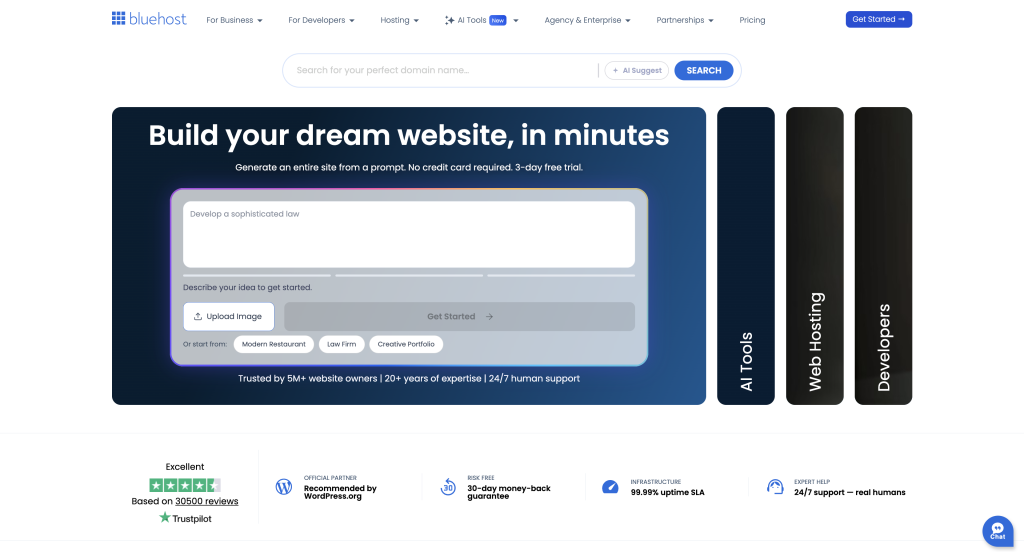
Bluehost ranks among the top choices for SSH-Enabled Shared Hosting, especially for WordPress website owners who want a balance of affordability, performance, and ease of use. Over the years, Bluehost has built a strong reputation for providing beginner-friendly hosting while still offering advanced tools for developers.
One of the standout features is how simple it is to activate SSH access directly from the hosting control panel. Users can quickly enable secure shell access without dealing with complex server configurations, making it an excellent option for both beginners and experienced website administrators.
In addition to standard SSH connectivity, Bluehost also includes a built-in terminal interface within its hosting dashboard. This feature allows users to execute command-line tasks, manage files, and perform WordPress-related operations directly from the browser without needing third-party SSH software.
For developers who regularly use command-line tools, WP-CLI, or advanced website management tasks, Bluehost’s SSH-Enabled Shared Hosting plans provide a convenient and user-friendly environment while keeping hosting costs affordable.
Bluehost offers a range of reliable SSH-Enabled Shared Hosting plans designed for beginners, bloggers, and growing businesses. Every shared hosting package supports WordPress installation and provides secure SSH access, allowing users to manage their websites more efficiently through command-line tools.
- Basic Plan : Starting at $2.95/month, Host 1 website, 10 GB SSD storage, Free SSL certificate, Free CDN integration, SSH access enabled, Easy WordPress installation, User-friendly control panel.
- Choice Plus Plan : Starting at $5.45/month , Host multiple websites, 50 GB SSD storage, Free domain for the first year, Free SSL certificate, Automatic website backups, Enhanced security features, Full SSH access support.
- Online Store Plan : Starting at $9.95/month, Optimized for eCommerce websites, 50 GB SSD storage, WooCommerce pre-installed, Secure payment integrations, Daily backups and advanced security, Performance optimization tools, SSH-enabled website management.
All Bluehost shared hosting plans come with a 30-day refund policy, giving users the confidence to try the service risk-free.
Additional Features ⚙️
- Easy SSH activation through the hosting control panel
- Built-in browser-based terminal for command-line management
- Free SSL certificate included
- Unmetered bandwidth on most plans
- Free domain registration for the first year
- WordPress pre-installation and one-click setup
- Automatic WordPress updates and security tools
- Global content delivery network (CDN) integration
- 24/7 customer support via chat and phone
- 30-day money-back guarantee
For users seeking reliable SSH-Enabled Shared Hosting, Bluehost combines developer-friendly tools, WordPress optimization, and affordable pricing, making it one of the most popular hosting choices for beginners and experienced website owners alike.
Developer Features of Bluehost SSH-Enabled Shared Hosting
For developers and advanced WordPress users, Bluehost’s SSH-Enabled Shared Hosting includes several tools that make website management and development easier.
| Developer Tool | Availability |
|---|---|
| Cron Jobs | ✅ Available |
| WP-CLI | ❌ Not Supported |
| Git Access | ✅ Supported |
| Composer | ✅ Supported |
| Command-Line MySQL Access | ✅ Available |
| PHP Version Selection | ✅ Available |
| Python Support | ✅ Supported |
| Node.js Support | ✅ Supported |
Bluehost’s SSH-Enabled Shared Hosting provides access to essential development tools such as Git, Composer, Cron Jobs, and command-line database management. While WP-CLI is not included on standard shared hosting plans, the available developer features are more than sufficient for most WordPress developers, freelancers, and website administrators.
Reliable support is an important factor when choosing SSH-Enabled Shared Hosting, and Bluehost offers multiple ways to get assistance whenever you need it.
| Support Channel | Availability |
|---|---|
| Live Chat | ✅ 24/7 |
| Phone Support | ✅ 24/7 |
| Email Support | ❌ |
| Support Tickets | ✅ |
| Knowledge Base | ✅ |
| Community Forum | ✅ |
Bluehost is known for its responsive customer support team. Users can quickly connect with a support representative through live chat or phone, making it easy to resolve hosting, WordPress, or SSH-related issues. In addition, Bluehost maintains an extensive knowledge base filled with tutorials, troubleshooting guides, and setup instructions.
For users looking for dependable SSH-Enabled Shared Hosting, Bluehost’s combination of 24/7 support, detailed documentation, and experienced technical staff adds significant value to its hosting plans.
To evaluate the quality of SSH-Enabled Shared Hosting, we analyze key factors such as page loading speed and uptime reliability. Bluehost performs well in both areas, making it a dependable choice for WordPress websites.
Bluehost Loading Speed
| Test Location | Average Load Time |
|---|---|
| East Coast USA | Fast Performance ⭐ |
| West Coast USA | Fast Performance ⭐ |
| Central USA | Good Performance |
| London, UK | Reliable Speed |
| Paris, France | Consistent Response |
| Mumbai, India | Stable Performance |
Bluehost Uptime
| Month | Uptime |
|---|---|
| March 2026 | 99.99% ⭐ |
| April 2026 | 99.98% |
| May 2026 | 99.99% ⭐ |
Bluehost’s SSH-Enabled Shared Hosting platform is built on SSD storage, optimized WordPress servers, and CDN integration, helping websites load quickly across multiple regions. Combined with its strong uptime record, Bluehost provides the reliability needed for blogs, business websites, and online stores that require consistent availability.




Leave a Comment