
8 Best Media Library manager plugins for wordpress websites. Images, videos, PDFs, and other media files play a vital role in creating engaging WordPress websites. However, as your website grows, managing hundreds or even thousands of files inside the default WordPress Media Library can become challenging. Since WordPress does not include advanced file organization features by default, finding specific media items often takes more time than it should.
A cluttered media library can affect your workflow, reduce productivity, and make content management frustrating. Fortunately, several WordPress media library plugins are designed to solve these issues. They help organize files into folders, improve search functionality, streamline media management, and keep your website running efficiently.
In this guide, we’ll explore eight of the best WordPress media library plugins that can help you organize, manage, and optimize your media files with ease.
1. Optimole- Smart Image Optimization for a Faster Media Library
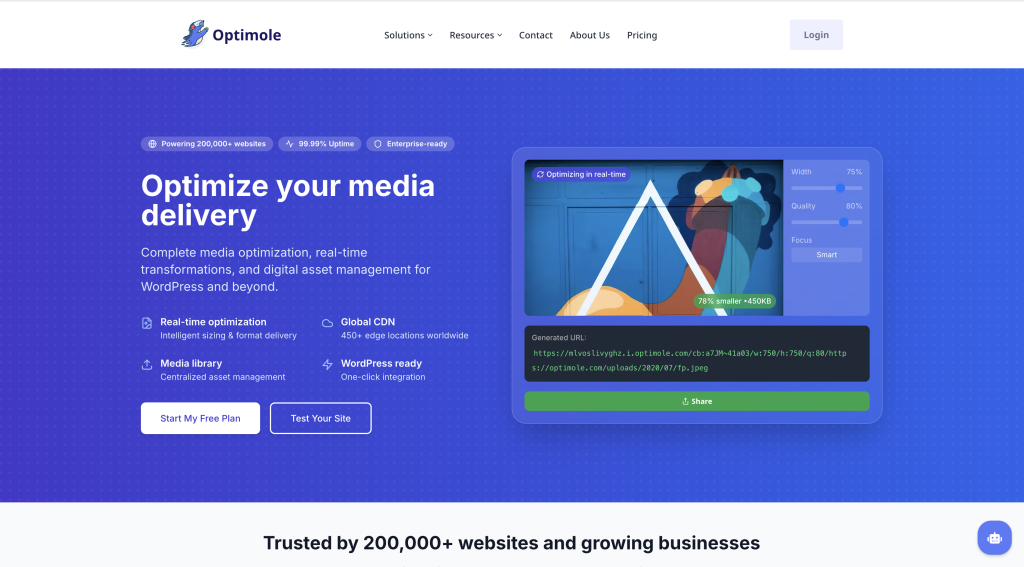
When managing a WordPress website, keeping your media library organized is important, but image performance is equally critical. That’s where Optimole stands out among the 8 Best Media Library Manager Plugins for WordPress Websites.
Unlike traditional media library plugins that mainly focus on organizing files and folders, Optimole enhances the overall efficiency of your media library by automatically optimizing and delivering images in the most suitable format for each visitor. This helps reduce page load times and improves user experience without requiring any technical expertise.
Key Features of Optimole
- Automatic Image Optimization: Optimole compresses and optimizes images in real time, helping your website load faster without noticeable quality loss.
- Adaptive Image Delivery: Images are served based on the visitor’s device, screen resolution, and network speed, ensuring optimal performance for every user.
- Global CDN Network: With hundreds of delivery points worldwide, images are loaded from the nearest server location to reduce latency.
- Page Builder Compatibility: Works smoothly with popular WordPress builders such as Elementor, Beaver Builder, and the Gutenberg Block Editor.
- Custom Watermarks: Protect your original images by adding custom watermarks directly through the plugin.
- Performance Analytics: View detailed reports showing storage savings, bandwidth reductions, and optimization results.
Why Choose Optimole?
A clutter-free media library is useful, but large image files can still negatively impact website speed. Optimole solves this problem by automating image optimization and delivery, making it an excellent addition to any WordPress site. Whether you run a blog, business website, portfolio, or online store, Optimole helps improve performance while reducing server resource usage.
Pricing
Optimole offers a free plan suitable for smaller websites with limited monthly traffic. For growing websites, premium plans provide higher visitor limits, cloud-based image storage, advanced optimization features, and dedicated support.
Final Verdict
If you’re looking for a plugin that not only manages media files but also improves website speed and image performance, Optimole deserves a place on this list of the 8 Best Media Library Manager Plugins for WordPress Websites. Its automated optimization features make it a valuable tool for WordPress users who want faster-loading pages and a better visitor experience.
2. Media Library Organizer – Simplify WordPress File Management
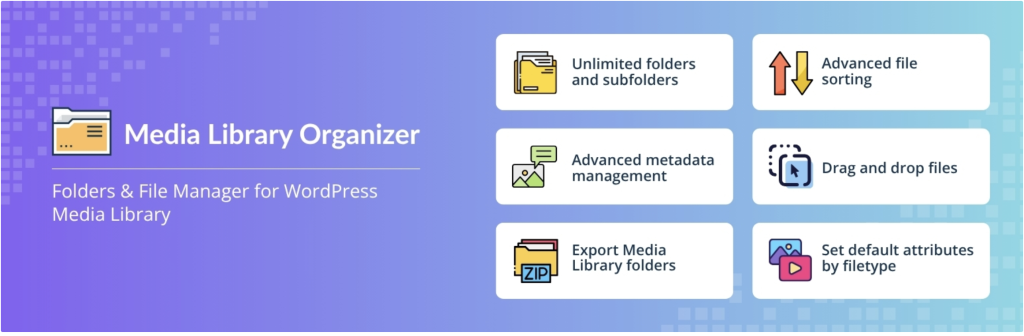
If your WordPress media library is filled with hundreds or even thousands of images, documents, and media files, keeping everything organized can quickly become a challenge. That’s where Media Library Organizer earns its place among the 8 Best Media Library Manager Plugins for WordPress Websites.
This plugin helps users structure their media files more efficiently by allowing them to create folders, subfolders, and categories directly within the WordPress dashboard. Instead of scrolling endlessly through an unorganized media library, you can arrange files into logical groups and access them whenever needed.
One of the biggest advantages of Media Library Organizer is its seamless integration with the native WordPress Media Library. Since it works inside the existing dashboard, there is no need to learn a new interface or switch between multiple screens.
Key Features of Media Library Organizer
- Drag-and-Drop File Management: Easily move images and media files into folders using a simple drag-and-drop system.
- Unlimited Folder Creation: Create as many folders, subfolders, and categories as needed to keep your content organized.
- Media Filtering Tools: Quickly locate files within the WordPress editor by filtering media based on folders or categories.
- Metadata Configuration: Set default metadata options for uploaded files to streamline media management.
- User-Friendly Interface: Designed for beginners and advanced users alike, making file organization simple and efficient.
Why Choose Media Library Organizer?
For photographers, designers, bloggers, and online store owners, a well-organized media library can save hours of work. Instead of searching through a large collection of files, you can instantly locate the images or documents you need. This improves workflow efficiency and makes website management much easier.
The plugin is especially beneficial for eCommerce websites that regularly upload product images, as well as portfolio websites that manage large collections of visual content.
Pricing
Media Library Organizer offers a free version that includes essential file management features, including unlimited folder and subfolder creation. Users who need advanced functionality can upgrade to the premium version, which provides additional tools such as image metadata editing and intelligent image categorization features.
Final Verdict
Media Library Organizer is an excellent choice for website owners looking to improve file organization without adding complexity to their workflow. Its intuitive design and powerful folder management capabilities make it a worthy addition to this list of the 8 Best Media Library Manager Plugins for WordPress Websites. If you regularly work with large amounts of media content, this plugin can significantly improve your productivity and media management experience.
3. Media File Renamer

Managing a large WordPress website often means handling hundreds or even thousands of media files. Over time, image names such as “IMG_1234.jpg” or randomly generated file titles can make your media library difficult to navigate. That’s why Media File Renamer is featured in our list of the 8 Best Media Library Manager Plugins for WordPress Websites.
This plugin helps website owners maintain a clean and structured media library by automatically generating meaningful and SEO-friendly file names. Instead of relying on confusing default file names, you can quickly rename media files to improve organization and make them easier to identify.
Media File Renamer is especially useful for multi-author websites where contributors upload images using different naming conventions. By standardizing file names, website administrators can create a more organized workflow and improve media management efficiency.
Key Features of Media File Renamer
- Automatic File Name Suggestions: Generates descriptive file names based on image titles and content.
- Bulk Renaming Support: Accept suggested file names for multiple files at once, saving valuable time.
- Site-Wide URL Updates: Automatically updates file references throughout your website when a file name changes.
- File Name Protection: Lock important file names to prevent accidental modifications.
- Improved Media Organization: Makes it easier to search, identify, and manage files within the WordPress Media Library.
Why Choose Media File Renamer?
A consistent file naming structure not only improves media organization but can also help with website maintenance and SEO. When media files have clear and descriptive names, administrators can quickly locate specific images and avoid duplicate uploads.
For agencies, blogs, news websites, and multi-author platforms, Media File Renamer simplifies file management by ensuring that all uploaded media follows a standardized naming convention.
Pricing
The plugin offers a free version that includes core renaming functionality. Users who need additional control can upgrade to the premium version, which provides advanced features such as manual file renaming and enhanced customization options.
Final Verdict
Media File Renamer is a practical solution for WordPress users who struggle with poorly named media files. Its automated renaming tools help create a cleaner and more organized media library, making it a valuable addition to our list of the 8 Best Media Library Manager Plugins for WordPress Websites. If you want better file organization and easier media management, this plugin is definitely worth considering.
4. Media Library Assistant
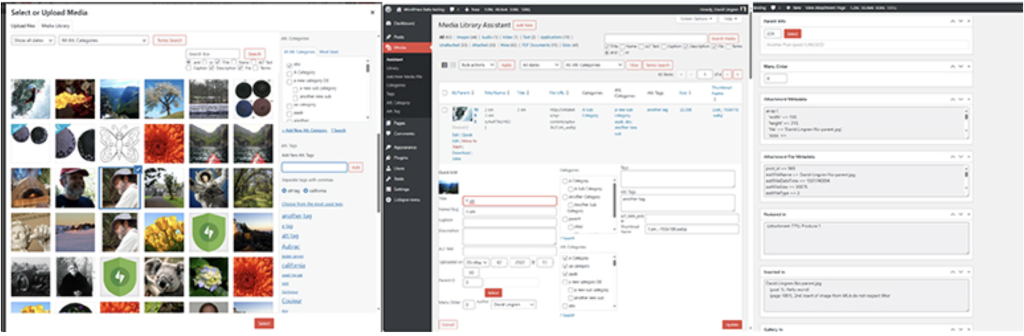
If you’re looking for more than basic folder organization, Media Library Assistant is one of the most powerful options available in this list of the 8 Best Media Library Manager Plugins for WordPress Websites. This plugin extends the default WordPress Media Library with advanced management, filtering, and metadata capabilities, giving users greater control over their media files.
Unlike many media library plugins that focus solely on organizing files into folders, Media Library Assistant provides detailed information about each media item and helps you manage how files are used throughout your website. This makes it especially valuable for content-heavy websites, blogs, online magazines, and business websites with large media collections.
Key Features of Media Library Assistant
- Custom Gallery Shortcodes: Create and display image galleries, tag clouds, and media term lists using flexible shortcodes.
- Enhanced Media Library Columns: View additional details such as the posts and pages where specific media files are currently being used.
- Advanced Metadata Management: Add and manage extra information including authors, categories, taxonomies, and custom fields.
- Powerful Filtering Options: Sort and search files by title, file size, upload date, media type, and other attributes.
- Improved Media Tracking: Quickly identify where images and documents are attached across your website.
Why Choose Media Library Assistant?
As websites grow, managing media files becomes increasingly difficult. Media Library Assistant solves this challenge by offering advanced organization and tracking tools that go beyond the default WordPress Media Library.
One of its most useful features is the ability to see where media files are being used on your site. This helps prevent accidental deletion of important images and makes content management more efficient. The plugin also provides extensive metadata controls, making it easier to organize large media collections.
For bloggers, publishers, agencies, and website administrators who manage hundreds of media files, Media Library Assistant can significantly improve workflow and productivity.
Pricing
One of the biggest advantages of Media Library Assistant is that it is completely free to use. Users can access all core features without purchasing a premium license, making it an excellent choice for budget-conscious website owners.
Final Verdict
Media Library Assistant is a feature-rich solution for WordPress users who need advanced media management capabilities. Its detailed filtering tools, enhanced metadata options, and media usage tracking features make it a strong contender in our list of the 8 Best Media Library Manager Plugins for WordPress Websites. If you need greater control over your WordPress media library without spending money, this plugin is definitely worth exploring.
5. Media Cleaner

As your website grows, your media library often becomes filled with old images, unused files, duplicate uploads, and media that is no longer connected to any content. These unnecessary files can consume valuable storage space and make media management more difficult. That’s why Media Cleaner deserves a place among the 8 Best Media Library Manager Plugins for WordPress Websites.
Media Cleaner is designed to help WordPress users identify and safely remove media files that are no longer being used on their websites. By cleaning up unnecessary files, you can reduce clutter, improve organization, and optimize your site’s storage resources.
The plugin scans your website and detects media items that are not linked to posts, pages, or other content. Instead of deleting files immediately, it moves them to a temporary trash area where you can review them before permanent removal.
Key Features of Media Cleaner
- Detect Unused Media Files: Automatically identifies images, documents, and other media that are no longer being used on your website.
- Safe Trash System: Moves unused files to a trash folder before deletion, reducing the risk of accidental data loss.
- Review Before Deleting: Inspect flagged files and restore important media if needed.
- Storage Optimization: Helps reduce unnecessary storage usage by removing outdated media assets.
- Storage Optimization: Helps reduce unnecessary storage usage by removing outdated media assets.
Why Choose Media Cleaner?
Over time, websites accumulate media files that are forgotten or no longer needed. These files can create unnecessary clutter and make managing your media library more challenging. Media Cleaner simplifies this process by helping you locate and remove unused content without manually checking every file.
The plugin is particularly useful for bloggers, eCommerce stores, agencies, and content-heavy websites that frequently upload images and media assets. By maintaining a cleaner media library, website owners can improve organization and free up valuable server space.
Pricing
Media Cleaner offers a free version that includes core cleanup functionality and is suitable for many WordPress websites. Users who require more advanced scanning capabilities can upgrade to the Pro version, which includes enhanced compatibility with page builders, additional detection methods, and deeper website analysis features.
Final Verdict
Media Cleaner is an excellent tool for keeping your WordPress media library free from unnecessary clutter. Its ability to safely identify and remove unused files makes media management easier while helping optimize website storage. For users looking to maintain an organized and efficient media library, Media Cleaner is a valuable addition to this list of the 8 Best Media Library Manager Plugins for WordPress Websites.
6. Export Media Library
Managing media files isn’t only about organizing and optimizing them. Sometimes, you may need to download your entire media library for backups, website migration, or offline storage. That’s where Export Media Library earns its place among the 8 Best Media Library Manager Plugins for WordPress Websites.
Unlike many media management plugins that focus on organization and file categorization, Export Media Library has a single purpose: allowing users to export their WordPress media files quickly and efficiently. Its simplicity makes it an excellent solution for website owners who need a hassle-free way to create backups or transfer media assets between websites.
The plugin packages your media files into a downloadable ZIP archive, making it easy to store, share, or migrate your content whenever needed.
Key Features of Export Media Library
- One-Click Media Export: Download your WordPress media files in a convenient ZIP format.
- Custom Folder Structure Options: Choose how your exported files are organized within the archive.
- Optional File Compression: Compress media files before creating the ZIP package to reduce file size.
- Simple and Lightweight: Easy to use without complicated settings or configurations.
- Ideal for Website Migration: Transfer media files to another WordPress website or backup location with minimal effort.
Why Choose Export Media Library?
Website owners often need access to their media files outside of WordPress. Whether you’re migrating to a new hosting provider, creating backups, redesigning your website, or simply keeping a local copy of important assets, Export Media Library makes the process straightforward.
Its lightweight approach ensures that even beginners can export their media library without dealing with technical complexities. The plugin focuses on doing one task well, making it a practical tool for WordPress users of all experience levels.
Pricing
One of the biggest advantages of Export Media Library is that it is completely free. There is no premium version or paid upgrade required, allowing users to access all available features immediately after installation.
Final Verdict
Export Media Library is a simple yet highly useful plugin for WordPress users who need an easy way to download and back up their media files. While it doesn’t offer advanced organization features, its reliable export functionality makes it a valuable addition to this list of the 8 Best Media Library Manager Plugins for WordPress Websites. If media backups and file migration are important to your workflow, this plugin is definitely worth considering.
7. Enable Media Replace

Replacing images or documents in WordPress can often be more complicated than it should be. Normally, users need to upload a new file, update references, and remove the old version manually. Enable Media Replace simplifies this process, making it a valuable addition to our list of the 8 Best Media Library Manager Plugins for WordPress Websites.
This plugin allows you to replace existing media files directly from the WordPress Media Library without changing file URLs or updating content manually. Whether you’re updating product images, replacing outdated graphics, or uploading revised documents, Enable Media Replace helps you complete the task quickly and efficiently.
By eliminating the need for duplicate uploads, the plugin also helps keep your media library clean and organized.
Key Features of Enable Media Replace
- Direct File Replacement: Replace images, PDFs, and other media files without deleting the original file first.
- Preserve Existing URLs: Maintain the same file URL, ensuring that links and embedded media continue to work correctly.
- Modification Date Display: Use built-in shortcode functionality to show file update dates and modification times on posts and pages.
- Plugin Compatibility: Works smoothly alongside popular media-related plugins and image optimization tools.
- Reduce Media Library Clutter: Prevent unnecessary duplicate files from accumulating in your media library.
Why Choose Enable Media Replace?
For website owners who regularly update visual content, this plugin can save a significant amount of time. Instead of uploading a new image and updating it across multiple pages, you can simply replace the existing file while keeping all references intact.
This is especially useful for eCommerce stores, business websites, blogs, and portfolio sites where images and downloadable files are frequently updated. By maintaining the original file path, the plugin minimizes maintenance work and improves workflow efficiency.
Pricing
Enable Media Replace is completely free to use. All core features are available without requiring a premium subscription or paid upgrade, making it an excellent choice for WordPress users on any budget.
Final Verdict
Enable Media Replace is a simple yet highly effective plugin for managing media updates in WordPress. Its ability to replace files without affecting existing URLs makes it a powerful productivity tool for website administrators. As one of the 8 Best Media Library Manager Plugins for WordPress Websites, it helps streamline media management while keeping your library organized and free from unnecessary duplicates.
8. WP Offload Media

When your WordPress website grows, media files such as images, videos, PDFs, and other assets can consume a significant amount of server storage and bandwidth. To address this challenge, WP Offload Media is one of the most powerful solutions featured in our list of the 8 Best Media Library Manager Plugins for WordPress Websites.
Instead of storing all media files directly on your web hosting server, WP Offload Media automatically transfers them to cloud storage services. The plugin then serves these files from the cloud, helping reduce server load, improve scalability, and enhance website performance.
This approach is particularly beneficial for high-traffic websites, online stores, membership sites, and content-rich blogs that manage large amounts of media.
Key Features of WP Offload Media
- Automatic Cloud Storage Integration: Upload media files directly to cloud storage providers instead of relying solely on your hosting server.
- Improved Website Performance: Reduces server resource usage by serving media files from external storage.
- Bandwidth Optimization: Helps lower bandwidth consumption on your hosting account.
- Seamless Media Delivery: Automatically generates and manages file URLs for images and other media assets.
- Scalable Storage Solution: Ideal for websites expecting continuous growth in media content.
Supported Cloud Storage Providers
WP Offload Media supports several popular cloud storage platforms, including:
- Amazon S3
- DigitalOcean Spaces
- Google Cloud Storage
These services provide reliable and scalable infrastructure, ensuring your media files remain accessible even during traffic spikes.
Why Choose WP Offload Media?
Large media libraries can impact website speed and hosting performance. By storing files in the cloud, WP Offload Media helps reduce the burden on your server while improving content delivery efficiency.
The plugin is especially useful for websites that regularly upload large image galleries, product photos, downloadable resources, or multimedia content. It also provides a future-proof solution for businesses that need scalable storage without constantly upgrading hosting plans.
Pricing
WP Offload Media offers a free version with essential cloud storage functionality. Users who require advanced features can upgrade to the Pro version, which includes tools for migrating existing media files, managing cloud assets directly from the WordPress dashboard, and integrations with popular eCommerce platforms and digital product solutions.
Final Verdict
WP Offload Media is an excellent choice for website owners looking to improve performance and reduce server storage usage. Its cloud-based media management approach makes it one of the most advanced options in this list of the 8 Best Media Library Manager Plugins for WordPress Websites. If your site handles a large volume of media content, this plugin can help improve speed, scalability, and overall website efficiency.
Final Thoughts: Which Media Library Plugin Should You Choose?
The WordPress Media Library is the central hub for managing all your website’s images, videos, documents, and other media files. As your site grows, keeping this library organized becomes increasingly important. A well-managed media library not only saves time but also improves workflow, enhances content management, and can even contribute to better website performance.
The good news is that the 8 Best Media Library Manager Plugins for WordPress Websites offer solutions for almost every media management challenge. Whether you need image optimization, folder organization, file renaming, media cleanup, cloud storage, or backup functionality, there’s a plugin designed to simplify the process.
Quick Overview of the 8 Best Media Library Manager Plugins for WordPress Websites
| Plugin | Best For |
|---|---|
| Optimole | Image optimization and faster website performance |
| Media Library Organizer | Creating folders and organizing media files |
| Media File Renamer | Automatically generating SEO-friendly file names |
| Media Library Assistant | Advanced media management and filtering |
| Media Cleaner | Removing unused and unnecessary media files |
| Export Media Library | Downloading and backing up media files |
| Enable Media Replace | Replacing existing media files without changing URLs |
| WP Offload Media | Storing media files in cloud storage services |
Our Recommendation
If your primary goal is improving website speed, Optimole is an excellent choice. For users managing thousands of images and documents, Media Library Organizer and Media Library Assistant provide powerful organization tools. If you’re concerned about server storage and scalability, WP Offload Media offers one of the best cloud-based media management solutions available.
Ultimately, the best plugin depends on your website’s needs. Many WordPress users even combine multiple plugins from this list to create a more efficient and streamlined media management system.
By choosing the right tool from these 8 Best Media Library Manager Plugins for WordPress Websites, you can keep your media library organized, improve website performance, and make content management significantly easier in 2026 and beyond.
Quick Summary of the Best WordPress Media Library Plugins
Choosing the right media library plugin depends on your website’s specific requirements. Some plugins focus on organization, while others improve performance, storage management, or file handling. Here’s a quick overview of what each plugin does best:
- Optimole – Enhances website speed by automatically compressing, optimizing, and delivering images in the most efficient format.
- Media Library Organizer – Helps keep your WordPress media files neatly arranged with customizable folders, subfolders, and categories.
- Media File Renamer – Simplifies media management by generating clear, descriptive file names and maintaining consistency across your website.
- Media Library Assistant – Provides advanced filtering, metadata management, and media tracking features for greater control over your files.
- Media Cleaner – Identifies and removes unused media files, helping free up storage space and reduce library clutter.
- Export Media Library – Allows you to quickly download your media files in a ZIP archive for backups, migration, or offline storage.
- Enable Media Replace – Makes it easy to update existing images or documents without changing file URLs or re-editing content.
- WP Offload Media – Stores media files on cloud platforms to reduce server load and improve website scalability and performance.
Each of these plugins offers unique benefits, making them excellent choices for improving media management in WordPress. Whether your goal is better organization, faster performance, easier file maintenance, or cloud storage integration, you’ll find a suitable solution among these top WordPress media library tools.
With this guide to the 8 Best Media Library Manager Plugins for WordPress Websites, you now have a clear understanding of how each plugin can help improve the way you manage media files in WordPress. From organizing folders and optimizing images to cleaning unused files and storing media in the cloud, these plugins offer practical solutions for websites of all sizes.
The best choice ultimately depends on your specific needs. If your priority is website speed, image optimization tools may be the right fit. If you manage a large collection of files, a plugin focused on organization and media management can save you valuable time. Likewise, cloud storage and media cleanup plugins can help improve performance and reduce server usage.
No matter which option you choose, implementing the right media library plugin can make your WordPress dashboard more efficient, improve workflow, and enhance your website’s overall performance.
Have you tried any of these 8 Best Media Library Manager Plugins for WordPress Websites? Do you have a favorite plugin that wasn’t included in our list? Share your experience, recommendations, or questions in the comments section below. We’d love to hear your thoughts and help you find the best solution for your WordPress website.

Get the Best Tools & Deals in Your Inbox
Join 10,000+ smart website owners and get exclusive deals, reviews and WordPress tips straight to your inbox






Leave a Comment